🖼️ Frames Guide
Generate the final images that bring your story to life
🖼️ What is a Frame?
A frame is literally the first or last frame of the video for a given shot. The first and last frames you generate in StableGen are to be used with AI video generators, along with the video prompts, to create the video for each shot.
- The frames for a shot are composited images that combine the characters and with a stage.
- Other settings like the choice of camera/lens/lighting all affect the frame's look.
- The frame agent pipeline combines all these elements and detailed instructions from the shot generation pipeline to create the image of your first/last frame.
🎨 Generating a Frame
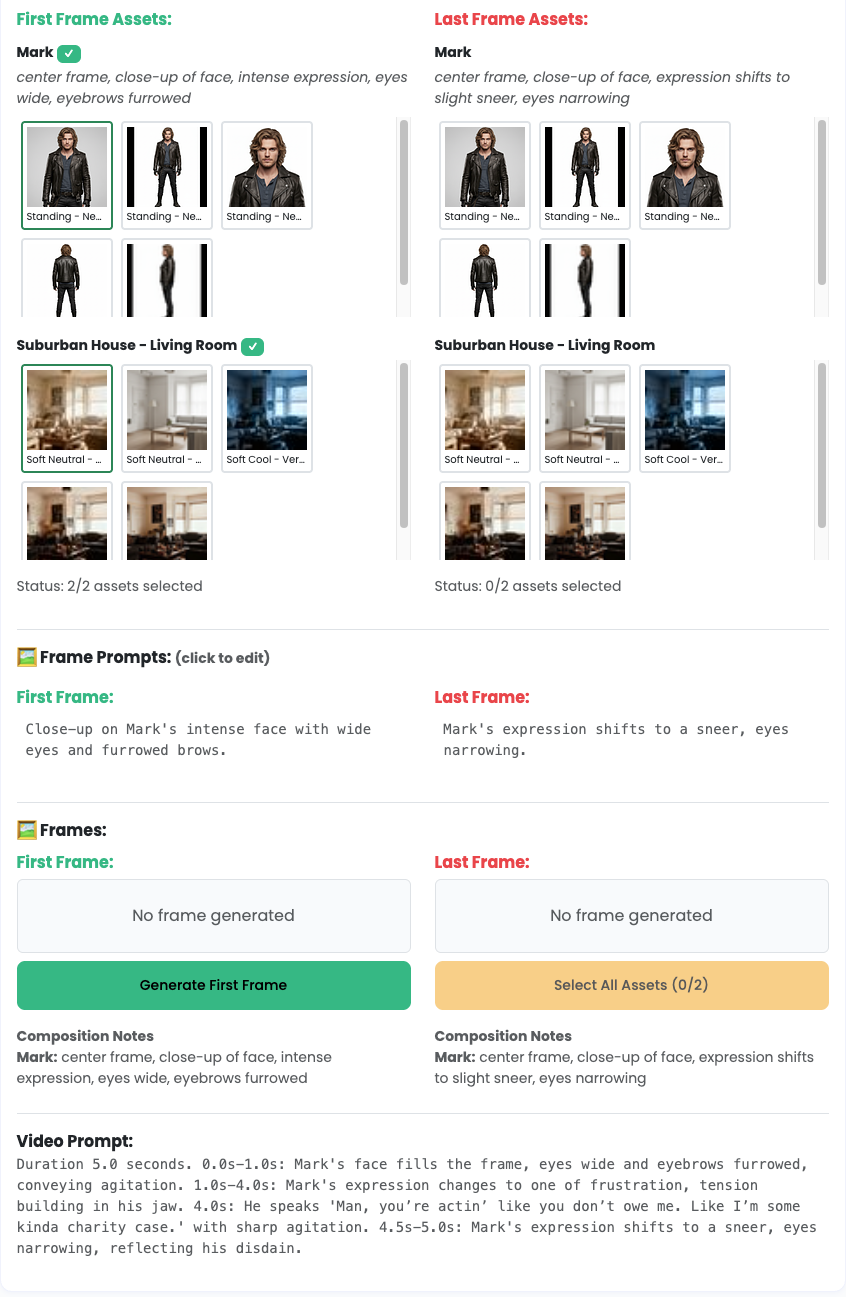
Follow these steps to generate a frame from a shot:
- Link entities for the shot. Characters and stages must be linked before you can generate frames.
- Select assets for every linked entity. Use the asset dropdowns in the Frame Assets panel. The status counter updates as you select assets.
- (Optional) Choose a reference frame. Pick a previous frame and describe how it should be used, then save the reference.
- Review the frame prompt. Click to edit if you need to steer composition or details.
- Generate First/Last Frame. The button enables when all required assets are selected. Token cost is shown next to the Frames header.
- Review the result. Use the version thumbnails to select your preferred frame, open it in the editor, or regenerate.
🖌️ Frame Composition
StableGen composes frames from the assets you select and the shot details:
- Background Layer: Stage/environment from your project
- Character Layer(s): Generated character assets in appropriate poses
- Lighting & Atmosphere: From your shot details and time of day
- Camera Perspective: Lens, angle, framing, and movement from the shot
- Reference Frame (Optional): Maintains continuity with earlier frames
🎬 From Frames to Final Video
StableGen provides first/last frame images and video prompts for each shot. These frames are the visual anchors you feed into your preferred AI video generator.
🚀 Next Steps
You now understand the entire workflow from creating a project, taking your raw script idea to a fully formatted script with shots, and to generate the frames and prompts for video generation. We also have these guides which help you create and fine tune the Characters and Stages and their image assets.
- Video Clips Guide → Learn how clips group shots for video generation
- Characters Guide → Create high-quality character assets
- Stages Guide → Build detailed background environments
- Prompting Guide → Learn prompting best practices
- Editing Guide → Master advanced editing techniques
Good luck we are excited to see what you create!